Thing Shadow
AWS IoT Core Client of ThingsPro Edge exposes device's up to date configurations and allow you to re-configure device and turn on/off services by shadow of Things.
You can follow the instructions in the picture below on the AWS portal.
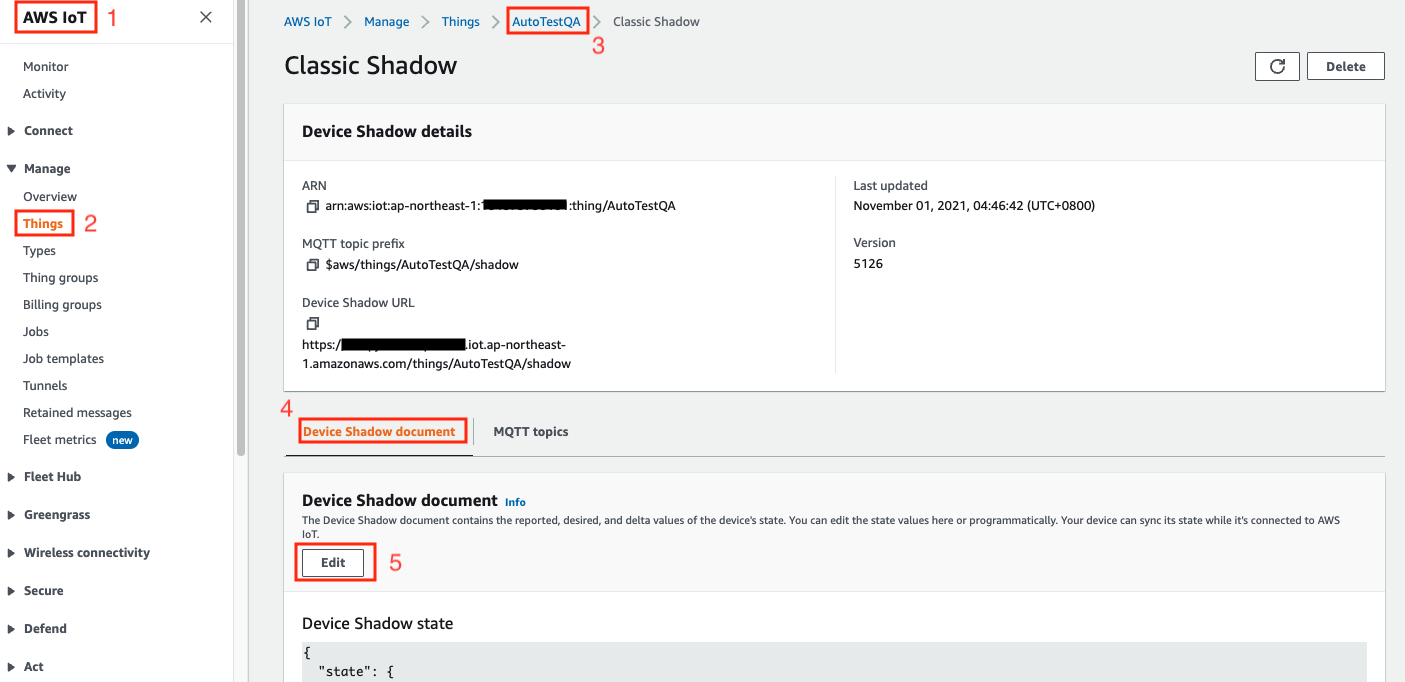
Thing Shodaw - Reported Properties
AWS IoT Core Client of ThingsPro Edge exposes device's up to date configurations by reported properties when it connected. The reported properties be categorize by below.
Sections of Reported Properties
| No | Section | Description |
|---|---|---|
| 1 | wan | Display network interface which connect to WAN. |
| 2 | general | List device general properties, such as CPU type, Firmware version, ThingsPro Edge version and etc. |
Sample of Reported Properties
{
  "desired": {
    "general": {
      "biosVersion": "1.1.0S01",
      "cpu": "ARMv7 Processor rev 5 (v7l)",
      "description": "",
      "deviceType": "gateway",
      "firmwareVersion": "1.2",
      "hostName": "Moxa",
      "lastBootTime": "2021-11-01T02:25:06+08:00",
      "memorySize": 2116501504,
      "modelName": "AIG-301-T-US-AZU-LX",
      "serialNumber": "TBZJB1060412",
      "thingsproVersion": "2.2.1-3324"
    },
    "wan": {
      "displayName": "LAN1",
      "dns": [
        "10.168.1.23"
      ],
      "gateway": "10.123.20.1",
      "ip": "10.123.21.216",
      "name": "eth0",
      "netmask": "255.255.252.0"
    }
  },
  "reported": {
    "general": {
      "biosVersion": "1.1.0S01",
      "cpu": "ARMv7 Processor rev 5 (v7l)",
      "description": "",
      "deviceType": "gateway",
      "firmwareVersion": "1.2",
      "hostName": "Moxa",
      "lastBootTime": "2021-11-01T02:25:06+08:00",
      "memorySize": 2116501504,
      "modelName": "AIG-301-T-US-AZU-LX",
      "serialNumber": "TBZJB1060412",
      "thingsproVersion": "2.2.1-3324"
    },
    "wan": {
      "displayName": "LAN1",
      "dns": [
        "10.168.1.23"
      ],
      "gateway": "10.123.20.1",
      "ip": "10.123.21.216",
      "name": "eth0",
      "netmask": "255.255.252.0"
    }
  }
}
Thing Shodaw - Desired Properties
AWS IoT Core Client of ThingsPro Edge allow you to re-configure device and turn on/off services via Desired Properties. In current version, AWS IoT Core Client allow below sections to be update via Desired Properties.
Sections of Desired Properties
| No | Section | Description |
|---|---|---|
| 1 | general | To update host name and device description. |
There are two keys that is commonly used in the desired properties:
1. General
Update device host name
{
    "desired": {
        "general": {
            "hostName": "MyHost"
        }
    }
}
Update device description
{
    "desired": {
        "general": {
            "description": "MyDevice"
        }
    }
}
Last updated on 2021-11-01 by GaryHsu77