Thing Shadow
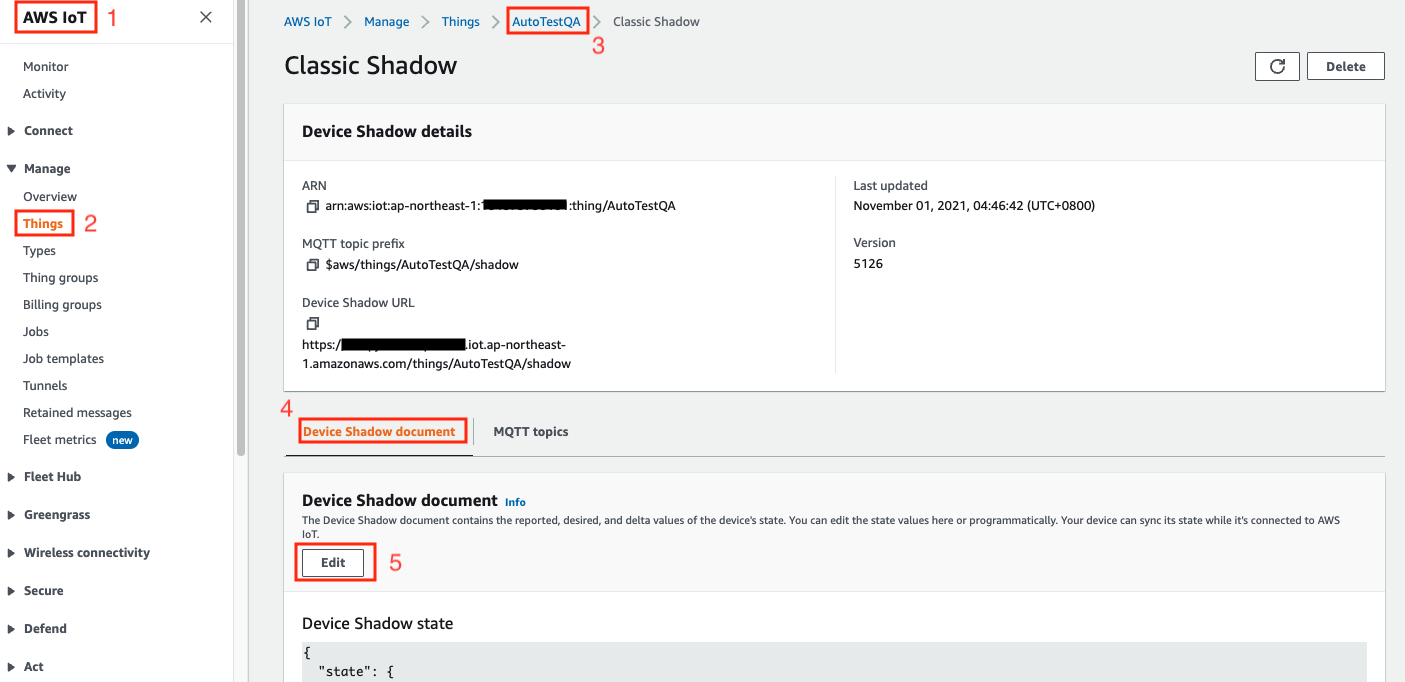
The AWS IoT Core client on ThingsPro Edge exposes the device's up-to-date configuration. You can use this thing (device) shadow to reconfigure the device and turn on/off services. Follow the sequence indicated in the image below to edit the device shadow.
Reported properties
The AWS IoT Core client on ThingsPro Edge exposes the up-to-date configuration of a connected device using its Reported Properties.
Reported Properties sections
The Reported Properties are organized in the following sections:
| No | Section | Description |
|---|---|---|
| 1 | wan | Displays info on the network interface that connects to WAN. |
| 2 | general | Lists the general properties, such as CPU type, Firmware version, ThingsPro Edge version, of the device. |
A sample of Reported Properties for a device
{
  "desired": {
    "general": {
      "biosVersion": "1.1.0S01",
      "cpu": "ARMv7 Processor rev 5 (v7l)",
      "description": "",
      "deviceType": "gateway",
      "firmwareVersion": "1.2",
      "hostName": "Moxa",
      "lastBootTime": "2021-11-01T02:25:06+08:00",
      "memorySize": 2116501504,
      "modelName": "AIG-301-T-US-AZU-LX",
      "serialNumber": "TBZJB1060412",
      "thingsproVersion": "2.2.1-3324"
    },
    "wan": {
      "displayName": "LAN1",
      "dns": [
        "10.168.1.23"
      ],
      "gateway": "10.123.20.1",
      "ip": "10.123.21.216",
      "name": "eth0",
      "netmask": "255.255.252.0"
    }
  },
  "reported": {
    "general": {
      "biosVersion": "1.1.0S01",
      "cpu": "ARMv7 Processor rev 5 (v7l)",
      "description": "",
      "deviceType": "gateway",
      "firmwareVersion": "1.2",
      "hostName": "Moxa",
      "lastBootTime": "2021-11-01T02:25:06+08:00",
      "memorySize": 2116501504,
      "modelName": "AIG-301-T-US-AZU-LX",
      "serialNumber": "TBZJB1060412",
      "thingsproVersion": "2.2.1-3324"
    },
    "wan": {
      "displayName": "LAN1",
      "dns": [
        "10.168.1.23"
      ],
      "gateway": "10.123.20.1",
      "ip": "10.123.21.216",
      "name": "eth0",
      "netmask": "255.255.252.0"
    }
  }
}
Desired Properties
The AWS IoT Core client on ThingsPro Edge allows you to re-configure a connected device and turn on/off services using its Desired Properties. In the current version, AWS IoT Core client allows the following sections to be update via Desired Properties.
Desired Properties sections
| No | Section | Description |
|---|---|---|
| 1 | general | Host name and device description |
There are two keys that are commonly used in the desired properties:
General
Updating device host name
{
    "desired": {
        "general": {
            "hostName": "MyHost"
        }
    }
}
Updating device description
{
    "desired": {
        "general": {
            "description": "MyDevice"
        }
    }
}
Last updated on 2022-07-21 by Cecilia Fernandes